I have been learning about Neural Networks and Image Classifiers through fastai recently, and wanted to try apply what I had learned to a problem outside the scope of that material.
The Problem
Any Irish person that drinks Guinness will probably have strong opinions on the quality of the drink in just about any pub they’ve been in (and non-Guinness drinkers might claim that it is all nonsense). The opinions range from ‘beautiful’ to slightly more offensive at the other end of the scale. Recently social media has filled with examples of lovingly-crafted and not-so-lovingly-crafted beverages.
I wanted to train a Neural Network to be able to distinguish between a good and a bad pint, and have documented the process of training the model below.
The Data
I collected approximately 300 images of pints of Guinness. Sourcing these images from social media helped because they were pre-identified as good or bad pints, making the labelling process easier. I didn’t do any cleaning on the images before trying to train the model – instead after training I used fastai’s built-in cleaning functionality to easily identify images that were not appropriate for the model.
The process to scrape and organise the images will become a post of its own at some point.
Examining the Data
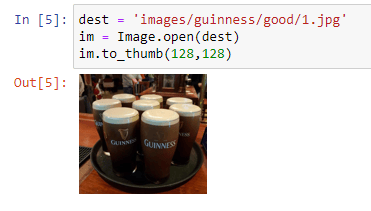
Checking a single image, to make sure file path works and that the filetype is actually an image.
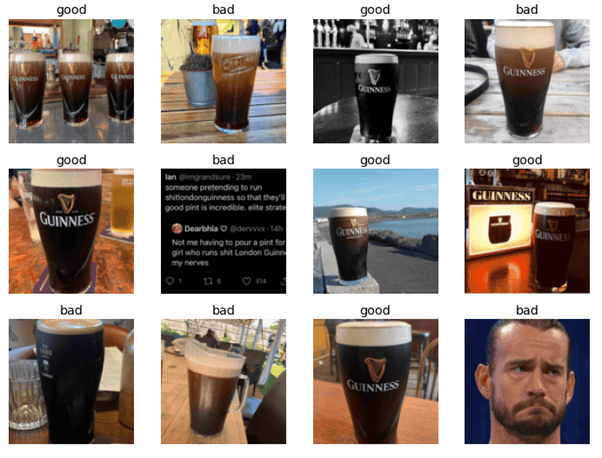
Pulling a set of images in, with their labels. Here we see that a few of the images are not pictures of pints, and these will need to be cleaned. fastai makes identifying them and deleting them fairly convenient, and will happen after the first round of model training.
Model Training Attempt 1
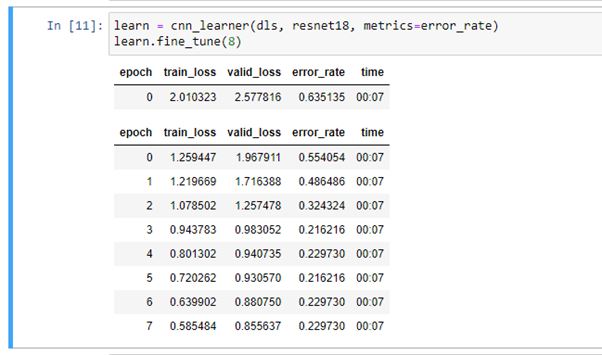
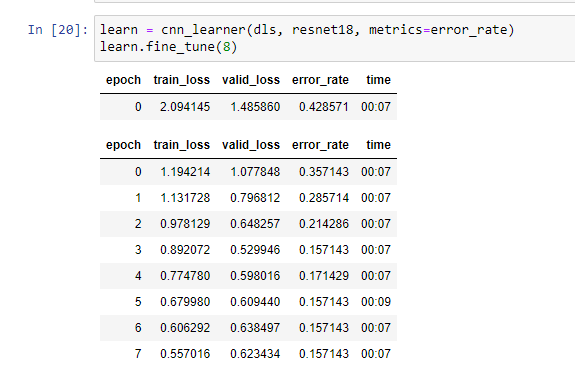
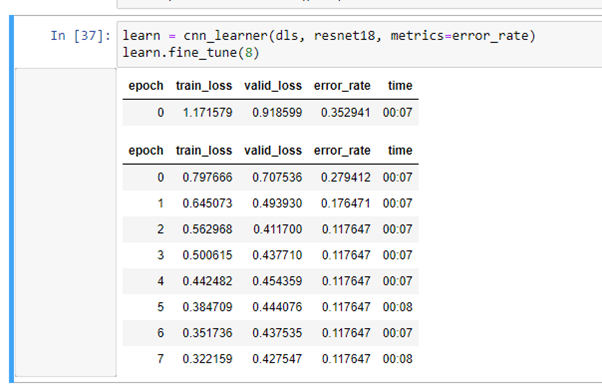
Without further ado, we get into it. Below is the first output of the model fitting. The neural network applies transfer learning based on fastai’s resnet18, over 8 epochs. Loss rates on the training and validation datasets decrease fairly steadily, while the classification error rate levels off after 4 or 5 epochs.
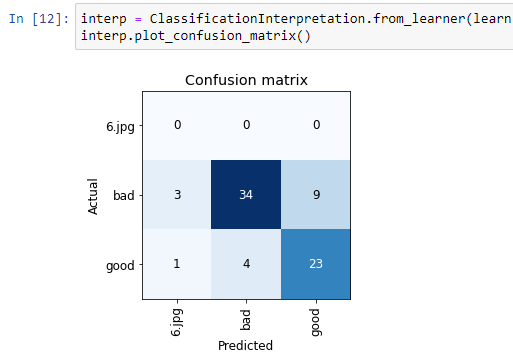
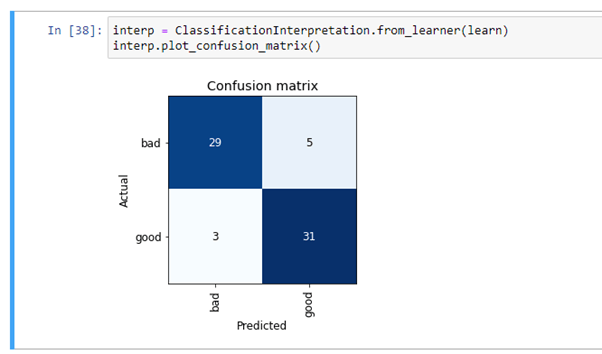
And the confusion matrix gives us a visual depiction of how the validation date is classified. It also tells us whether bad pints are being misclassified as good or vice-versa. The first thing I learned here is that there is something off with the data structures that I am feeding into the model. As well as good and bad, the matrix has a category of ‘6.jpg’ which obviously shouldn’t be there. ‘number.jpg’ is the format I would expect from the images I am using, so something has gone wrong there. Apart from that things don’t look too terrible. This iteration of the model classified 9 good pints as bad, and 4 bad pints as good.
Data Clean 1
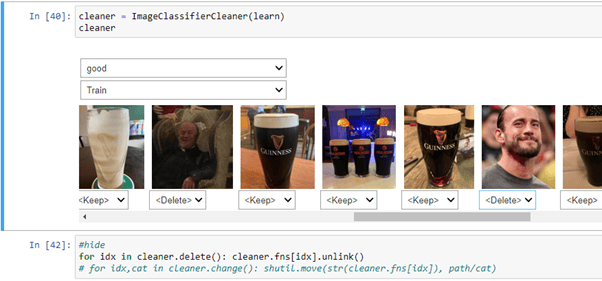
Fastai’s functionality for cleaning images displays the images that the model is least sure about, and then allows the user to make quick decisions on deleting or recategorising them. You can do this across the training and validation set, and the categories within the data (in this case ‘good’ and ‘bad’).
Here’s how that looks. Clearly there are some odd images in here.
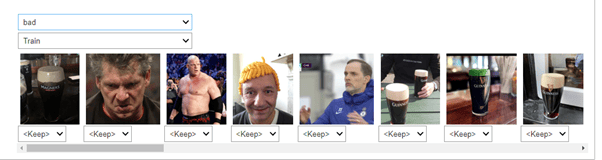
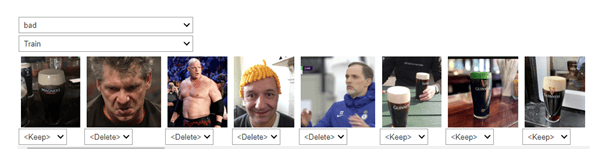
I applied the same process to the ‘bad’ validation set, and both datasets for the ‘good’ group.
Model Training Attempt 2 + 3
Immediately the results are better.
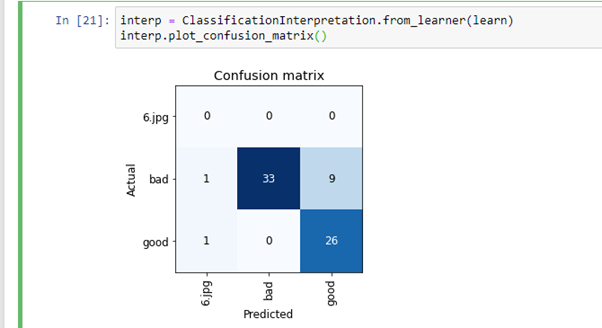
Oops. Still hadn’t fixed that ‘6.jpg’. A quick check of the data showed that there was a folder in with the source images called ‘6.jpg’. This folder was being picked up as a category (with a single image in it), so I corrected that.
Another couple of cleans of the data gives incrementally better results:
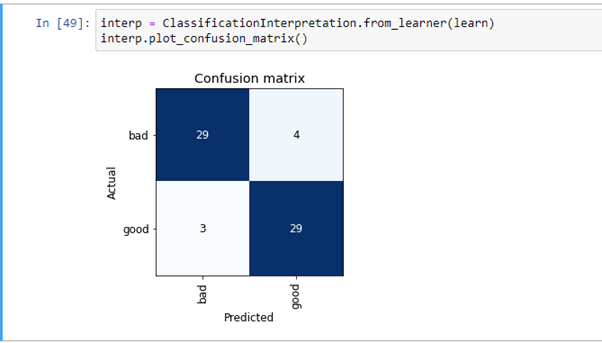
And a classification matrix that actually makes sense.
But there is still some image cleaning to be done:
The final (for now) model
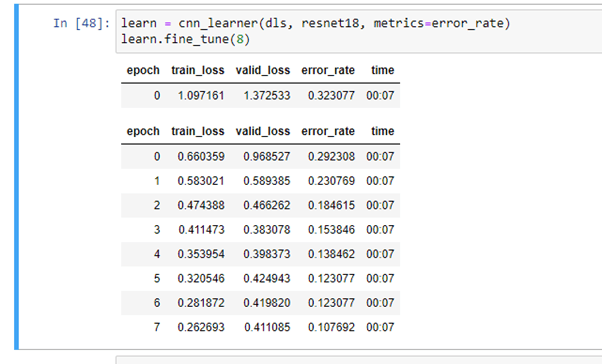
After a final clean, the last run of the model gives us slightly better results again, with an error rate of just over 10%.
And the classification matrix shows 58 correct classifications, with 7 incorrect classifications.
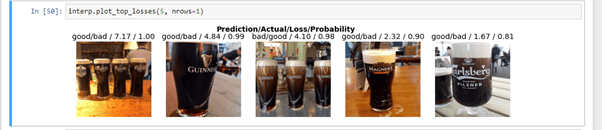
Here are some of the image that the model is classifying incorrectly. The tags above the images show prediction/actual, so good/bad means the model thought it was good and that it was actually bad. The final figure identifies the probability the model assigned to it – aka how confident the model was.
The images that confused the mode are interesting. It doesn’t seem to do well with images of multiple pints. Also, the first image shows pints that look decent in a non-Guinness glass. Feeding the model a lot more data might allow it to learn to differentiate between glass types or brand logos.
What next?
I exported the model and will publish it using Binder. I’ll also try set up an embedded model in this blog.
Finally, I’ll look at what improvements I can make to the model to improve its accuracy.
The code is on github.

